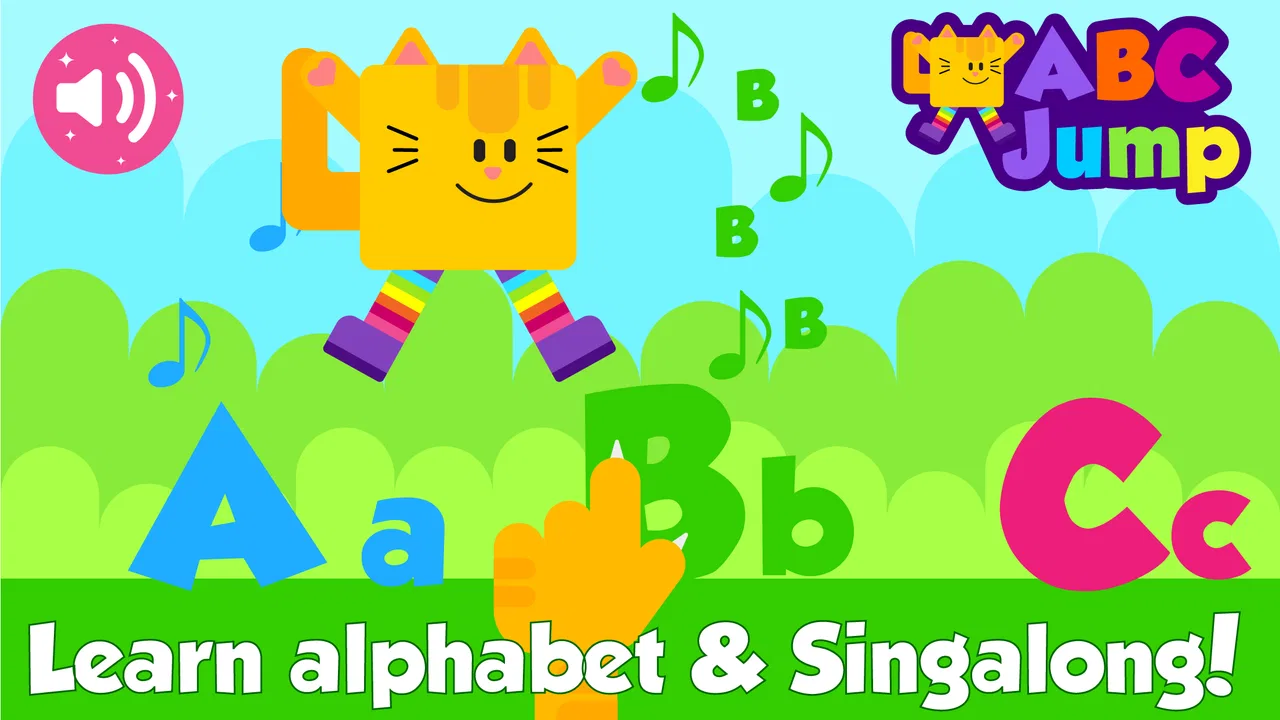
ABC Games for Kids - ABC Jump
- 4.3
- Rating
- 10.00K
- Installs
- Free
- Price
 Analysis by App-foxy
Learning the alphabet can feel like work when a child is asked to sit still and repeat the same letters. My first impression of ABC Games for Kids - ABC Jump was more practical: it turns a short learning task into a small game loop. A child acts, receives immediate feedback, gets a sense of reward, and then has a clear reason to try another round. That structure matters more than flashy presentation for preschool learning, because young children usually need frequent, understandable feedback before they are ready for longer lessons.
This is a free educational game from Cubic Frog® Apps-Learning Games for Kids, aimed at children in the Everyone age group. It brings together alphabet practice, ABC flash cards, letter tracing, spelling, and phonics in one child-focused package. The store summary is broad, but the useful question is how those activities work together in everyday use. In my experience, its main value is not replacing a parent, teacher, or full reading program. It is giving a child a simple way to revisit early letter skills in short bursts.
The app has an average rating of 4.3 from around 130 ratings and has passed 10K+ installs. It is free to start, although in-app purchases range from $5.99 to $29.99 per item. The release date is Apr 17, 2022, and the current version is 1.4. It supports devices running Android 4.4 or later, which makes it accessible on older Android hardware that many families still keep for children.
You May Also Like

 Blood Strike: 2.5 Anniversary
Blood Strike’s Loadouts Turn Every Drop Into a Tactical Gamble
A close look at Blood Strike’s custom loadouts: how fast access to signature weapons reshapes its battle royale rhythm, rewards preparation, and narrows the gap between fights.

 Pandora - Music & Podcasts
Pandora’s Music Is Easy to Start, but Harder to Recover
Pandora’s strength is its low-effort path from a seed to a station. Its weak spot is how much confidence it asks you to place in connection, setup, and quiet recovery.

 8 Ball Pool
 Is Built on Rivalries, Rematches, and Routine
A close look at the rivalries, rematches, shared routines, and unanswered safety questions that turn a quick pool match into a persistent mobile community.

 Samsung Music
’s Quiet Strength Is Playing What You Already Own
Its reach comes less from spectacle than from dependable access to a personal library. That simplicity is both the app’s strongest retention engine and its ceiling.

 AccuWeather: Weather Radar
AccuWeather Review: A Quick, Clear Forecast for Everyday Decisions
For everyday plans, the best forecast is the one you can understand quickly. AccuWeather makes rain timing, radar, and local conditions easy to act on, with a few trade-offs.

 Hill Climb Racing
Why Hill Climb Racing Still Turns Crashes Into One More Run
A tiny car, a bumpy hill and one more upgrade: Hill Climb Racing keeps resurfacing because its simple chaos makes every near-miss feel personal.
More From Our News Desk



How the ABC Jump learning loop works
I look at ABC Jump as a sequence of small, manageable turns rather than a lesson that needs to be completed all at once. In this section, I’ll focus on how a parent can use that rhythm to notice whether a child is recognizing letters, practicing control, or simply tapping through. That distinction is useful when deciding what kind of support to offer next.
The first action is simple enough for a young learner
The strongest part of the design is the low entry barrier. A child can begin with a letter-centered activity rather than needing to understand a complicated menu, manage several game rules, or read a long instruction. That is important for children who are still learning letter names themselves. When the first action is obvious, the adult does not have to turn every play session into a technical lesson.
The activities cover several early literacy actions rather than focusing only on recognition. Flash cards help with repeated exposure, tracing brings hand movement into the lesson, spelling asks the child to connect letters in sequence, and phonics shifts attention toward sounds. I like that combination because knowing the shape of an “A” is not the same as understanding how letters participate in reading. The app gives families a way to move between those related skills without opening several separate tools.
In a realistic home situation, I would use it after breakfast or before a child’s bedtime story, not as a long classroom replacement. A child might trace a few letters first, move into a recognition activity, and then finish with a sound or spelling exercise. The useful workflow is to stop while the child is still engaged rather than pushing through every available activity. Short sessions make the repetition feel manageable and leave the next round feeling like a choice instead of a punishment.
One practical tip is to watch what the child does before helping. If the child taps quickly without looking at the letter, the problem may be attention rather than alphabet knowledge. If the child recognizes the letter but struggles with tracing, the difficulty may be fine-motor control. Separating those two situations helps a parent decide whether to repeat the same activity or switch to a different one. The app becomes more useful when the adult treats each activity as a small observation opportunity, not merely as screen time.
Feedback gives each attempt a clear rhythm
For a preschool game, feedback has to arrive quickly and make sense. The basic rhythm here is action, response, and another opportunity. A child chooses or traces something, sees whether the attempt worked, and can continue without waiting through a complicated sequence. That rhythm is what makes the educational content feel like play rather than a worksheet placed on a phone.
The feedback is most valuable when it encourages a child to notice the difference between an accidental tap and a deliberate answer. Parents can reinforce that by asking, “Which letter did you choose?” or “What sound does it make?” immediately after a turn. Those questions add a spoken layer that the device cannot provide by itself. They also reveal whether the child is learning the letter or simply following visual patterns.
There is a trade-off, though. Fast feedback can keep a child moving, but it can also encourage guessing if the adult never slows the session down. I would not leave a beginner with the expectation that every correct response proves mastery. A better approach is to pause occasionally and ask the child to find the same letter in a book, on a food package, or on a handwritten note. That turns the app’s quick response into a bridge toward real-world reading.
The phonics and spelling elements are especially useful when they are treated as follow-up practice rather than isolated challenges. After a child recognizes a letter, I would say its sound aloud and connect it to a familiar word. The child does not need a formal explanation of phonics terminology. A simple connection between symbol, sound, and word is enough to make the digital response meaningful.
Rewards create a reason to continue
A good reward in an early-learning game does not need to be elaborate. The immediate satisfaction of completing an action can be enough when the next task is clear and achievable. ABC Jump’s appeal comes from making alphabet practice feel active and repeatable. The child is not only looking at a card; there is a sense of doing something, receiving a response, and moving forward.
That reward structure works best for children who lose interest during passive memorization. A flash card on its own can become background noise, while a game-like activity gives the child a small target. The target should remain the learning action, however. I would praise the child for identifying, tracing, or sounding out a letter rather than praising speed. Speed can encourage careless tapping, while recognition and control are the skills the child actually needs.
Another useful technique is to let the child choose the next type of practice when possible. If tracing is tiring, a parent can shift to flash cards. If recognition seems easy, spelling or phonics may provide a more meaningful challenge. This kind of choice preserves the reward without allowing the session to become random tapping. It also helps a child notice that learning can involve different kinds of effort.
The free starting point makes the app easy to test with a child before spending money. Families should still pay attention to where optional purchases appear, because the in-app items cost between $5.99 and $29.99 each. I would make any purchase decision based on repeated, useful engagement rather than a single excited session. If the child returns willingly and benefits from the activities, an optional expansion may be easier to justify; if the child only enjoys the novelty, keeping the free experience is the sensible choice.
Resetting the session keeps practice from becoming overwhelming
The reset is an underrated part of children’s learning games. A young child needs to feel that a mistake is temporary and that another attempt is available. ABC Jump works best when each short activity is treated as a fresh start. Instead of carrying frustration from one wrong answer into the next, the child can try again with a smaller emotional cost.
I recommend using a simple session boundary at home. For example, an adult can decide that the child will complete a few focused activities and then put the device away for a story or a physical game. The exact length should depend on the child’s attention, not on reaching a particular in-app milestone. Ending after a successful attempt can be more effective than waiting until the child becomes restless, because the child remembers competence rather than exhaustion.
Resetting also gives parents a chance to change the goal. One session can emphasize letter shapes, another can focus on sounds, and a later one can connect spelling with words the child already knows. This prevents the app from becoming a repetitive test with one narrow definition of success. The same basic content can support different learning moments when the adult changes the question around it.
There is a limitation here for families seeking detailed progress tracking. I would not treat this as a complete assessment system or assume that repeated play automatically shows balanced improvement. A child may become very comfortable with familiar prompts while still struggling to identify letters in a book. Parents who need formal records, lesson planning, or a carefully sequenced curriculum will likely prefer a more structured literacy platform or teacher-led program.
Where it fits beside usual alphabet alternatives
Compared with alphabet videos, this game asks the child to respond instead of only watching. That makes it more useful when the goal is active recall, tracing, or a quick check of recognition. Videos can be better for introducing a song, story, or pronunciation model, but they often allow a child to remain passive. I would use a video to start interest and this app for a short turn-taking practice session.
Compared with paper flash cards, the app offers a more immediate response and avoids preparing, sorting, or storing cards. Paper still has an important advantage: it encourages conversation and makes it easy to move around the room looking for letters. If a child already spends too much time on screens, physical cards and magnetic letters may be the better choice. The digital format is convenient, but convenience should not become the only learning environment.
Compared with a full reading curriculum, ABC Jump is lighter and easier to pick up. That is its strength and its boundary. It can reinforce early alphabet knowledge, tracing, spelling, and phonics, but it should not be expected to teach reading comprehension, writing composition, or a complete progression through decoding. I see it as a practice companion for the earliest stage, not as the only educational resource a child uses.
The app is a particularly good fit for a child who enjoys tapping and short challenges, needs repeated exposure to letter forms, or benefits from switching between visual, motor, and sound-based activities. It is less suitable for a child who becomes overstimulated by mobile games, needs a quiet tactile approach, or already needs advanced reading instruction. It may also be the wrong choice for parents who want extensive customization or detailed reporting rather than a straightforward practice tool.
Small habits that make the activities more effective
My first recommendation is to pair screen practice with a physical follow-up. After a tracing activity, have the child draw the same letter with a finger in flour, on paper, or in the air. After a phonics activity, ask the child to name another word beginning with that sound. These transitions take the skill away from the screen and show whether the child can use it in a different setting.
My second recommendation is to use familiar names and objects. If the app presents a letter, connect it to the child’s name or something visible nearby. That creates a stronger memory than repeating the symbol without context. It also makes spelling practice less abstract, especially for children who are not yet interested in written words.
My third recommendation is to resist correcting every mistake immediately. Give the child a moment to look again, listen, or try the tracing path with more control. If help is needed, describe the next step instead of taking the device away. The goal is to keep the action-feedback-reward cycle belonging to the child. Too much adult intervention can turn an independent game into a test supervised by someone else.
It is also worth checking the device before handing it over. Older Android hardware is supported because the minimum operating system is Android 4.4, but the experience can still depend on the particular phone or tablet. I would make sure the screen responds accurately, the sound is comfortable, and the child can hold the device safely. These simple checks matter more than technical specifications when tracing and tapping are central to the activity.
My verdict on the complete loop
ABC Jump succeeds when viewed as a compact cycle: the child takes a first action, receives quick feedback, feels a small reward, and begins another attempt after a clean reset. That loop gives alphabet practice a useful sense of momentum without demanding a long lesson. I especially like the way its activities can be used for different purposes: recognition when a child is beginning, tracing when hand control needs practice, and phonics or spelling when the child is ready to connect letters with language.
Its weaknesses come from the same simplicity that makes it approachable. It is not a substitute for conversation, books, handwriting practice, or a complete reading curriculum. Parents need to guide the pace, watch for guessing, and connect the on-screen tasks with real objects and words. The optional purchase range also means families should try the free experience carefully before deciding whether additional content is worth the cost.
Overall, I would recommend it to parents looking for a low-pressure alphabet game for short Android practice sessions. The free entry point, Everyone rating, broad early-literacy focus, and support for Android 4.4 or later make it easy to consider for a young learner’s device. I would skip it if you need formal progress reports, advanced reading instruction, or a completely screen-free method. For the right child, though, the reason to start another session is clear: one more letter, one more sound, and one more chance to turn a quick game into something remembered.
FAQs for ABC Games for Kids - ABC Jump
01What is ABC Games for Kids - ABC Jump?
ABC Games for Kids - ABC Jump is an educational game designed to help young children become familiar with the alphabet through simple, interactive activities. The app combines letter recognition, colorful visuals, sounds, and playful challenges to make early learning more enjoyable. It is generally aimed at preschool and kindergarten-age children who are beginning to identify letters and associate them with sounds and words.
02Is ABC Games for Kids - ABC Jump suitable for my child’s age?
The game is primarily intended for preschoolers and early learners, although the ideal age may depend on the child’s reading level and familiarity with the alphabet. Younger children may need help understanding the instructions at first, while children who already recognize most letters may find the easier activities less challenging. Parents should review the available modes and difficulty before leaving a child to play independently.
03Does ABC Games for Kids - ABC Jump require an internet connection?
Many basic educational games can be played offline after installation, but certain features may depend on an internet connection. For example, advertisements, analytics, updates, additional content, or external links may not work without connectivity. It is a good idea to open the app once while online, check which activities are available offline, and test it in airplane mode before using it during travel or away from home Wi-Fi.
04Is ABC Games for Kids - ABC Jump safe for children to use?
The app is designed for children, but parents should still check its privacy settings, advertising behavior, and any links leading outside the game. Depending on the version and platform, the app may include ads or optional purchases. Adult supervision is recommended during the first sessions so you can confirm that the content is appropriate, disable unwanted purchases, and make sure the child does not accidentally access unrelated websites or store pages.
05Does ABC Games for Kids - ABC Jump really help children learn the alphabet?
ABC Games for Kids - ABC Jump can support early alphabet practice by giving children repeated opportunities to recognize letters, hear sounds, and respond to visual prompts. However, it should be treated as a learning aid rather than a complete reading program. Children usually benefit most when the app is combined with parent-guided practice, picture books, handwriting activities, and conversations about the words and sounds introduced in the game.
Pros
- Simple controls make it suitable for preschoolers.
- Bright visuals and cheerful sounds help maintain attention.
- Short levels fit well into quick learning sessions.
- Playable offline
- making it useful during travel.
- Rewards encourage children to keep practicing letters.
Cons
- Limited content may become repetitive for older children.
- Some activities offer little challenge after basic letters are learned.
- Frequent sounds and animations may distract sensitive children.
- Progress options may be too basic for parents and teachers.
- Ads or in-app purchases may vary by device and version.

ABC Games for Kids - ABC Jump
Gallery